Wednesday, June 4, 2014

Photo Credit: C. Seaman

Blog Post #6: Microsharing

Making Connections

Sharing bits of information (text, audio, video), known as microsharing, has emerged as the most powerful means for individuals to connect both professionally and personally. These bits of information are quick to transmit electronically and easily accessed. Thoughts are pitched and ideas are launched via microsharing. Through social communities such as Linked In and Twitter, relationships are made and dialogues initiated in the context of a connection.  Collaborative wisdom thru microsharing is here now and available on a global scale. Define your interests and get started today with Linked In and Twitter. In brief, this is how I came to use and value microsharing.


Getting Started

Linked In

http://icons.iconarchive.com/icons/

Recently I connected with my professional association, The American Dental Hygienists' Association (ADHA) http://www.adha.org. I chose this connection due to the stream of research, regulatory, and legislative updates that are posted that can affect and influence my career. I wanted to use this as a base to build a network of individuals who are associated with dentistry. It is important to build connections to share knowledge and product data.

 Additionally, I added a connection with an individual, Anne Guignon. Anne is a Registered Dental Hygienist and a thought leader in my profession who researches and speaks around the globe to dental hygiene professionals. She is also an adjunct faculty at the University of Texas School of Dentistry as well as a revered columnist/senior consulting editor at PennWell. Thru this individual I am informed of the most current research and trends in the profession. Her link is: http://www.linkedin.com/pub/anne-guignon/

Twitter

http://icons.iconarchive.com/icons
Currently I am following 86 entities on Twitter. Some more passively than others. The first person I chose to follow on Twitter was Edudemic. Edudemic is not a person but a collaborative group (community) of like-minded individuals. This reminded me of a meta-analysis in research and I appreciate this level of evidence. They can be located on Twitter: @Edudemic. I selected this option because they were described as being a dedicated community of educators and technologists looking to enhance learning, which aligns with my own educational vision statement.

Who to Follow

 Who is Edudemic following? I found they were following another group called The Teaching Professor. Twitter address: @teachprof. When I looked at their profile and tweets I found that they were driven by presenting the best teaching strategies supported by the most current research. This vision resonated with me and aligned with my own, so I chose to follow The Teaching Professor also.

     Other individuals that Edudemic was following and I also selected to follow are:
  • Curtis Chandler: educator, fun-expert, education specialist. Twitter address: @CurtisChandler6
  • George Couros: innovative learning and teaching. . Twitter address:@gcouros
  • Connie Malamed: professional explainer. Twitter address:@elearningcoach
  • Vicki Davis: a teacher helping teachers. Twitter address: @coolcatteacher


Monday, June 2, 2014

Versal Course

A Unique Technology Tool Promoting Robust Learning Experiences

Please click link to access the Versal course. Prepare to be intrigued.
https://versal.com/c/eilrsz/an-overview-of-versal


Sunday, June 1, 2014

What is a WikiSpace? 

Collaboration and Learning
Photo Credit: A. Butler, 2013

     Spending time with friends working, playing, and conversing can create valuable learning experiences. Online collaboration using blogs, email, allows for the creation of spaces to encourage individuals to engage and learn at heightened levels. Technological advances, specifically social media tools, have given individuals a platform that supports learning thru inclusion and interaction.
     WikiSpaces organize and present information for user groups that is simple to access and navigate. Wiki's create a learning space where users can share photos, diagrams, videos, and papers with each other. WikiSpace technology represents a method to promote transformative learning, where new information is mixed with the existing, then internalized to amend and broaden the knowledge of the users. In reality, very little learning is derived from formal training. Most of what we know is rooted in experiences and interactions with others. 
     The WikiSpace allows this type of learning and can be an effective means to socialize learning and reach new heights with others. I have provided a link that presents a WikiSpace tutorial in the Lesson Plans http://www.lessonpaths.com/ format. Please follow the link below to watch the tutorial and get started.  


Thursday, May 29, 2014

Managing the Information Pipeline 

   
C. Seaman photo
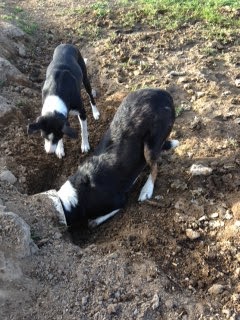
 Springtime on the farm begins in a flurry with the arrival of baby calves and tender seedlings. The workload shifts a bit to a slower, peaceful pace pierced only by the shrill chirping of the yellow-bellied marmot commonly known as the rock chuck or chuck. The Border Collies, furloughed from their duties with the cattle, spend hours tracking these large ground squirrels. One chirp sends the pups running here and there, looking in random pipes, holes, and stumps without a plan or a successful outcome. Managing the plethora of information in today's society can resemble this scenario; individuals with their heads in the pipeline, running out of time, on the hunt for new and meaningful data. 
     Fortunately, with the assistance of aggregators (feed readers, news readers, RSS readers) the task can be managed simply and efficiently. Subscription to a feed reader such as RSS (Real Site Summary or Real Simple Syndication), scours websites, blogs, browsers, and feeds to consolidate the updated information; creating for the user a personal and unique information space. Aggregation technology brings the information directly to the user saving time and honing the information to the interests of the user. Feed readers may be web, mobile, or desk-top based to meet the demand needs of the user and can be accessed anywhere by the user with an internet connection. 
     Examples of popular web-based feeds include: Bloglines, FrescaNews, Feedly and Digg Reader. Personally, I selected Feedly (http://www.feedly.com) as my current feed reader. The application met my needs for ease in use and the streamlined, categorized display of feeds makes it easy to navigate. Based on my interests, Feedly routinely suggests other sources of information to enrich my lifelong learning experience.
     Manage your information pipeline! Start today by bringing the information to you with the efficiency and accuracy of a feed reader that meets your needs. Let your feed reader be the chirp of the chuck that guides your information hunt.

RSS -Bing Images

Feedly-Bing Images